
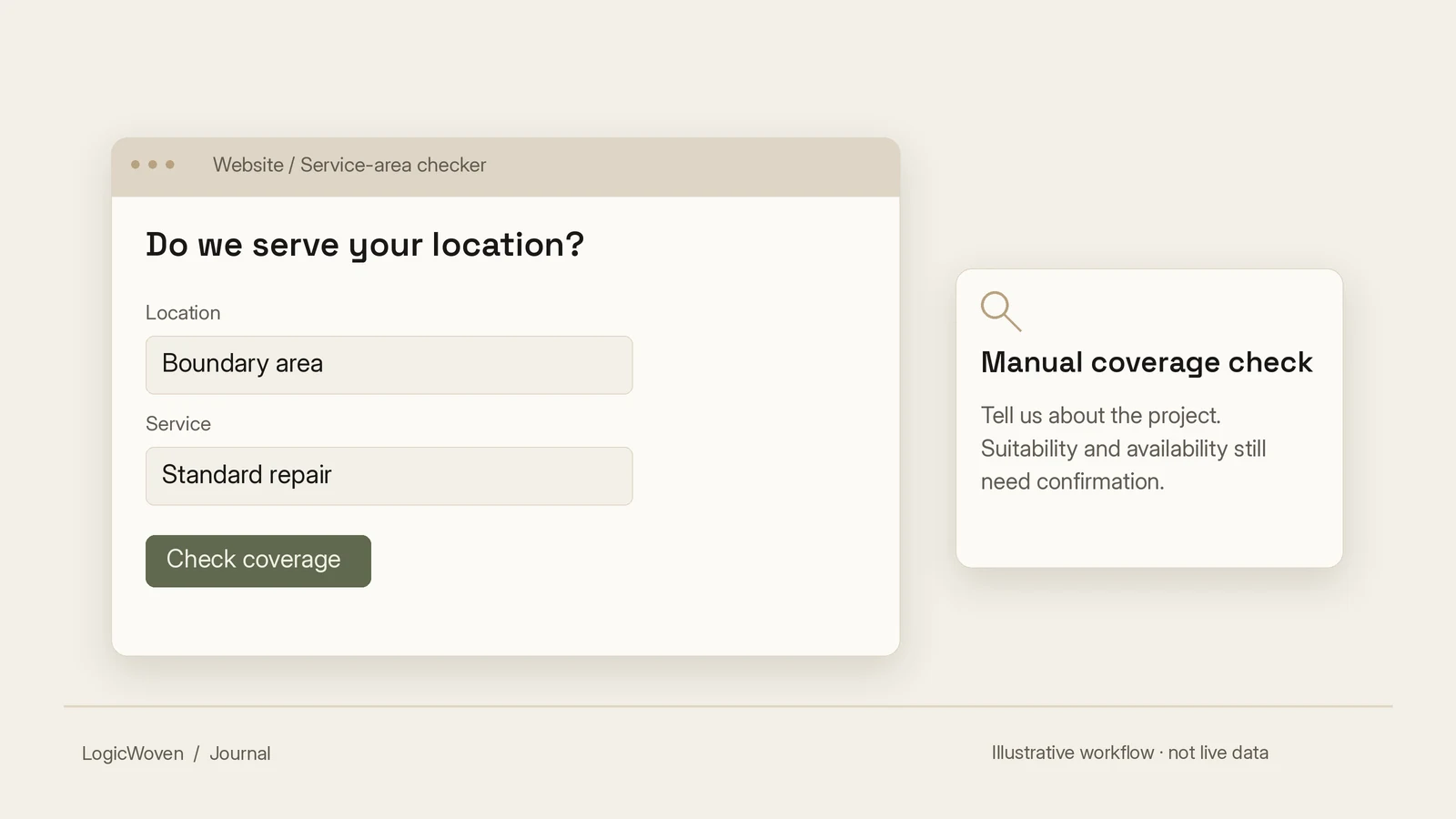
A service-area checker is a better first website interaction than a chatbot when the visitor's main question is simple: “Do you serve my location?” Use an owner-approved coverage rule, give a clear answer, and preserve a human route for uncertain cases. Do not make visitors hold a conversation to retrieve information your business already knows.
That does not mean every local business needs a checker. If your coverage fits into a short, accurate sentence, publish the sentence. An interactive tool becomes useful when coverage depends on location and service type, or when visitors repeatedly misunderstand the boundary. The buying decision is whether a small eligibility interaction would remove meaningful confusion—not whether your website looks sufficiently AI-enabled.
Start with the coverage decision, not the component
Write down what the business can decide from the visitor's input. “We normally serve this ZIP code” is different from “We can complete your job tomorrow.” Geographic eligibility is not a commitment about availability, technical suitability, price, or response time.
A useful checker returns a limited set of outcomes:
- Within the usual area: invite the visitor to describe the job.
- Outside the usual area: explain the boundary without implying a personal rejection.
- Needs a location review: offer a contact route instead of guessing.
- Unable to check: admit the technical failure and keep the inquiry path open.
Treat these as proposed interface states, not business policies copied from a template. Your operations owner must approve the actual wording and conditions. If staff regularly accept exceptions, a rigid “not available” screen could exclude work they would otherwise consider.
Build the rule sheet before the screen
Ask the person who schedules work to describe the real coverage policy. A marketing map may be broader than the territory the team currently serves. A list of cities may hide partial coverage, while a travel-radius rule may not reflect where staff actually travel.
Use this coverage worksheet to expose the ambiguity before development:
| Field | Decision to record |
|---|---|
| Covered services | Which service categories can this checker answer for? |
| Geographic rule | Approved ZIP list, named area, or another explicit boundary |
| Exceptions | Conditions that require a staff decision |
| Minimum input | What is necessary to check location without overcollecting data? |
| Positive result | Exact wording that does not promise availability or price |
| Uncertain result | Destination and owner for manual review |
| Rule custodian | Person authorized to change coverage |
| Review trigger | Territory, staffing, or service changes that require an update |
Give the rule sheet a version and approval date. Keep the website wording and the underlying data tied to that version. Otherwise, a designer can update the visible map while the checker continues using an older list.
Start with the least detailed location input that supports the decision. If a ZIP code is sufficient, do not request a street address merely because the form component makes it easy. If the rule requires a precise address, explain why and review its storage and use before collecting it.
What a Webflow build option actually establishes
Webflow's April 30, 2026 announcement describes AI-generated code components, including location finders, which can be refined through conversation or code.[2] The same announcement says publishing a site containing an AI code component requires a paid Workspace or a CMS-or-higher site plan.[2]
That is a documented build option, not evidence that an automatically generated checker will apply your coverage policy correctly. It is also a historical announcement, not a new release this week. Verify current account eligibility before choosing the implementation.
The policy should remain understandable outside the generated code. A developer needs to know where coverage data lives, what happens if it cannot load, and how an authorized person changes it. A simple maintained table may be more appropriate than a model interpreting free-form location descriptions. Reserve conversational assistance for questions that genuinely need clarification.
Hypothetical scenario: a repair business with boundary exceptions
Consider a fictional repair company that serves its core territory for all standard work but reviews larger jobs beyond that territory individually. Its existing website says “serving the region,” so visitors cannot tell whether contacting the company is worthwhile.
The proposed checker asks for service category and ZIP code. A matching core-area result says, “This location is in our usual service area. Tell us about your project so we can confirm suitability and availability.” A boundary result says, “This location needs a manual coverage check. You can still send a project inquiry.”
The checker does not estimate travel fees or diagnose the repair. It also does not hide the contact link after a negative result. Those choices preserve the limited purpose of the interaction.
Before release, the office manager supplies synthetic test cases from the core area, the boundary, and outside the territory. The team compares the displayed outcomes with the approved rule sheet. This is an illustrative design, not a LogicWoven client result or a conversion claim.
Test the decisions visitors will see
A successful prototype is not merely one that looks correct when given a familiar ZIP code. Test meaningful disagreements between the rule and the input.
- Known eligible location: does the answer use the approved wording?
- Known ineligible location: can the visitor still understand the next step?
- Boundary location: does it reach manual review rather than invent certainty?
- Unsupported service: does the checker avoid implying that geography establishes service eligibility?
- Malformed input: is the correction specific and understandable?
- Unavailable coverage data: does the interface disclose the failure instead of defaulting to “outside area”?
- Keyboard and small-screen use: can someone enter, submit, read the result, and continue without pointer-only interaction?
Have the operations owner inspect the outcomes, not just the developer. The developer can verify that a lookup matches a table; the business must verify that the table matches reality.
Measure usefulness without promising more leads
Record checker completions, result categories, continued inquiries, and cases staff later reclassify. Define a false exclusion as a visitor classified outside coverage whose request the business would actually accept. Review these cases before celebrating a reduction in unsuitable inquiries.
A lower inquiry count can mean better self-qualification, added friction, or a broken component. A higher count can include more irrelevant requests. Compare the quality and handling of the resulting inquiries, with traffic-source and seasonal differences recorded. Do not treat component clicks as customers.
Budget for implementation, hosting or plan requirements, testing, coverage updates, and the time needed to review uncertain cases. A checker may be unnecessary if a better service-area page solves the problem. It should also remain separate from a pricing calculator; eligibility does not authorize an estimate.
Make the next step specific
LogicWoven's website design and development work can include a scoped coverage interaction, connected to an appropriate inquiry path. Start with the coverage policy and a small test set, not a request for an all-purpose chatbot.
Discuss your service-area prototype and bring the current coverage wording, common visitor questions, and the person who can approve exceptions. The first useful deliverable is an agreed decision rule—not a promise of conversion uplift.