
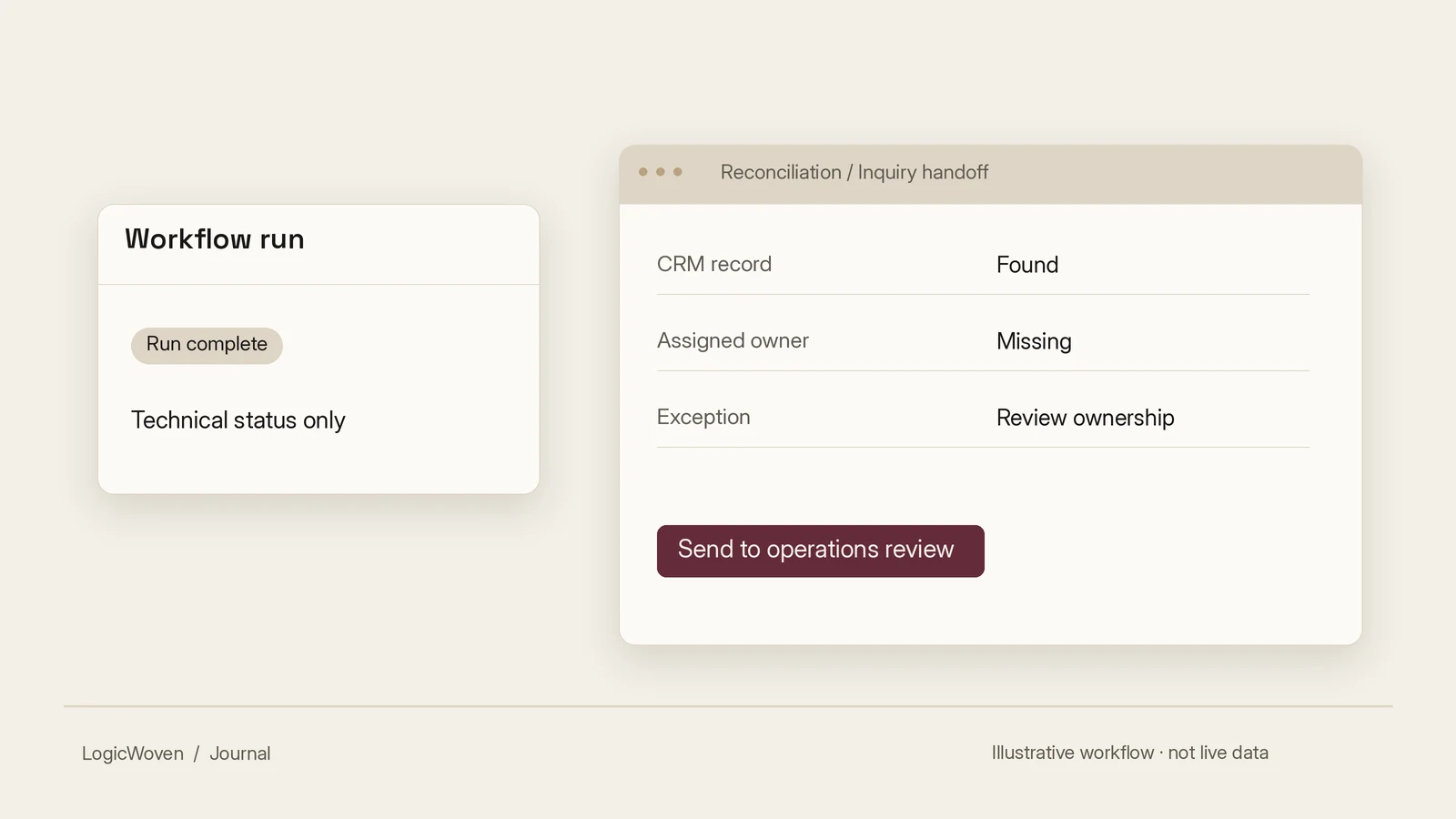
Monitor whether each eligible input reaches the business state you intended, not only whether an automation reports a successful run. For a lead workflow, that may mean a traceable CRM record with the correct named owner. A completion indicator is useful technical evidence, but it is not a substitute for checking the handoff itself.
The practical method is reconciliation: compare accepted source inputs with their expected destination records and flag the gaps. Define the match, the allowed delay, the exclusions, and the person who reviews exceptions. Without those definitions, a dashboard can look reassuring while the business remains uncertain about which inquiries need attention.
Separate receipt from completion
Consider the website-to-CRM journey. Webflow documents a 200 response as confirmation that a webhook was successfully captured.[4] That is a statement about receipt at the endpoint, not a documented guarantee that your downstream CRM assignment has finished correctly.
Webflow also documents retries after unsuccessful responses and possible webhook deactivation after repeated delivery failures, with email notification.[4] Those behaviors justify watching transport health. They do not remove the need to inspect the destination state after a successful receipt.
Use separate labels for separate facts:
- Source accepted: an inquiry exists in the source record set you intend to process.
- Transport captured: the receiving component recorded the event.
- Destination matched: the intended CRM record is identified.
- Handoff complete: the required ownership and status fields meet the business rule.
- Exception recorded: an unresolved case has a reason and reviewer.
These labels are a proposed monitoring model, not vendor-provided stages that automatically exist in every stack. Map them to available evidence before promising a dashboard.
Define the unit you are reconciling
An inquiry, a contact, and an opportunity are not necessarily the same thing. A returning contact may submit a new inquiry; several inquiries may belong to one organization. If you compare only contact totals, those relationships can hide missing work.
Choose an identity that matches the business question. For inquiry delivery, preserve a stable source reference and a mapping to the destination record or task. Decide how repeat submissions and repeated event delivery should appear. Do not use a person's name alone as the matching rule.
Also decide which inputs are excluded. Spam, internal tests, unsupported forms, and deliberately rejected requests may not belong in the active-work queue, but exclusion should have a recorded reason. Otherwise a missing record and an intentional rejection become indistinguishable.
Write a reconciliation specification
Use this worksheet to turn “monitor the leads” into an implementable requirement. The design remains a proposal until tested against the actual systems.
| Specification field | Required decision |
|---|---|
| Source of truth | Which source records define the eligible input set? |
| Coverage window | Which start/end timestamps and timezone define the comparison? |
| Match key | How is each source inquiry connected to its destination work? |
| Completion condition | Which record, owner and status must be present? |
| Allowed delay | When should an incomplete handoff become an exception? |
| Exclusions | Which cases are intentionally omitted, with what evidence? |
| Exception categories | Missing record, missing owner, ambiguous match, delayed processing, or unavailable evidence |
| Reviewer | Who receives the exception list and who covers absence? |
| Data minimization | Which identifiers are enough without copying message contents? |
| Monitor health | How is a failed or stale reconciliation itself detected? |
| Evidence retention | Where is the comparison result kept and for how long? |
Choose the allowed delay from the actual business requirement and architecture. This article does not prescribe a universal polling interval or response-time promise. A batch import and an actively staffed inquiry desk need different expectations.
Hypothetical scenario: the run is green, the owner is blank
Imagine an inquiry arriving from a service-business website. The receiving workflow completes its configured steps and creates a CRM record. A routing rule no longer matches the inquiry's category, so the owner field remains blank.
A monitor that checks only for failed runs may show no issue. A reconciliation that checks the agreed handoff condition finds the record but flags missing ownership. The exception goes to the designated operations reviewer with the source reference and reason, not a vague message that “automation may be broken.”
This is a hypothetical failure pattern, not an observed incident or a claim about a specific connector. It illustrates the value of monitoring the intended state independently from whether the implemented steps completed.
Check for silent gaps and false alarms
An empty exception list can mean everything matched. It can also mean the comparison did not run, source access failed, or a query selected no records. Record the last successful comparison and whether source and destination evidence were actually available. Report “unknown” when evidence is unavailable rather than displaying a reassuring zero.
At the same time, avoid escalating every short-lived delay. Define when a record is old enough to count as an exception, then retain the reason for that rule. If a delayed inquiry resolves before the window closes, the report should distinguish that from an unresolved case rather than inflating incident totals.
Use controlled tests to verify the detector:
- Create a synthetic source inquiry with no destination match.
- Create a destination record without the required owner.
- Introduce an ambiguous match that must not be silently guessed.
- Include an explicitly excluded test record and verify the exclusion reason.
- Withhold comparison access and verify an unknown or monitor-failure state.
- Run a matching case and verify it does not create a false exception.
These tests require authorization and a safe environment. They are not instructions to alter live customer records merely to prove a point.
Keep detection separate from recovery
The monitoring specification should say who reviews a gap and what information they receive. It should not silently grant the monitor permission to resend messages, recreate records, or change assignments. Recovery is a separate workflow with its own authority and duplicate checks.
That boundary also helps scope maintenance. Someone must maintain the comparison when forms, CRM fields, routing rules, or access change. Include implementation, software, review effort, and ongoing maintenance in the operating budget. Monitoring adds visibility; it does not establish a guaranteed conversion increase or cash saving.
LogicWoven helps connect websites, CRM workflows, and operational responsibilities. Discuss handoff reconciliation to define one measurable handoff and the evidence needed to know when it has not completed.
Sources
[4] https://developers.webflow.com/data/docs/working-with-webhooks